Drive Hider 3.0
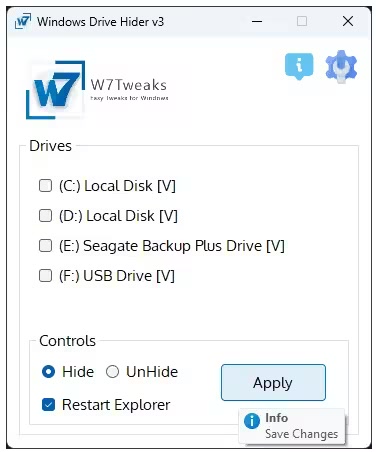
Drive Hider 3.0 | Size: 43 MB
Language: English
Windows Drive Hider is a simple, yet powerful tool designed to hide active or visible drives in My Computer, File Explorer, and File Open/Save Dialog boxes – all with just one click.
Key Features
One-Click Drive Hiding: Instantly hide single or multiple drives at once.
Context Menu Integration: Add Windows Drive Hider to your Windows desktop right-click menu for quick access.
Lightweight and Portable: No installation needed — small in size but big on functionality.
Registry Access: Modifies the Windows Registry to hide drives, so some antivirus software may flag it as suspicious. Simply add it to your trusted apps.
UI Access Lock: Lock application UI with password.
Take full control over your drive visibility with ease!
Easily hide or unhide specific drives with just a click.
Optionally restart Windows Explorer automatically to apply changes instantly.
Designed with a clean and user-friendly interface for smooth navigation.
Automatically detects all available drives, including USB and external storage.
Fully compatible with both Windows 10 and Windows 11 systems.
Whats New
Updates: official site does not provide any info about changes in this version
HOMEPAGE:
https://www.w7tweaksapp.com/
FREE DOWNLOAD LINKS:
https://rapidgator.net/file/c6f3c85635f55017ca3115dc9455696b/Drive_Hider_3.0.zip
https://ddownload.com/e93lds0793fa/Drive_Hider_3.0.zip

Information
Users of Guests are not allowed to comment this publication.