MicroSD SD Format Tool 5.0
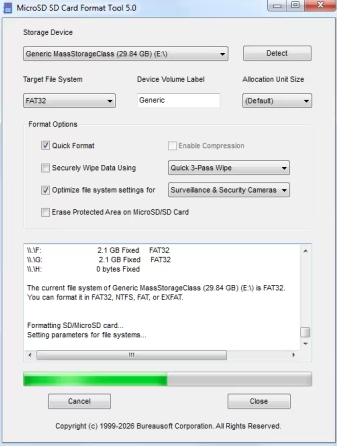
MicroSD SD Format Tool 5.0 | Size: 689.7 KB
Language: English
The software formats all types of SD memory cards and optimizes file systems according to use cases, such as for drones, gaming consoles, dash cams, cameras, security, surveillance, smartphones, tablets, portable music players, video players, ebook readers, GPS navigation systems, startup devices, boot loader, industrial switch, routers, and home appliances, in a safe way that replaces Windows Format operations. The software reduces data corruption and enables faster access to the cards.
SD cards are classified by capacity into four main types: SD (up to 2GB), SDHC (2GB-32GB), SDXC (32GB-2TB), and SDUC (2TB-128TB). SDHC uses FAT32, while SDXC/SDUC utilize exFAT for high-speed data access. Choosing depends on device compatibility and storage needs (e.g., 4K video requires SDXC/SDUC). Some dash cams require FAT32 for MicroSD, SD, SDHC, and SDXC. Unfortunately, the largest FAT32 volume that Windows can create is 32GB for most MicroSD cards and SD cards. The volume is too big for FAT32 is the common error message reported by Windows. This software is created to solve the problem.
The software provides quick and easy access to the full capabilities of your MicroSD memory cards and SD memory cards. The software is designed specifically for memory cards using MicroSD, SD, SDHC, SDXC, and SDUC standards. It is strongly recommended to use the MicroSD SD Format Tool software instead of formatting utilities provided with operating systems that format various types of storage media. Using generic formatting utilities may result in less than optimal performance for your memory cards, and on certain devices, they may result in data corruption.
All MicroSD and SD memory cards have a Protected Area on the card for the SD standard's security function. The security function in the protected area of an MicroSD/SD card, known as CPRM (Content Protection for Recordable Media), is a hardware-based security layer designed to prevent unauthorized copying of copyrighted, high-value data, such as paid media or proprietary, highly sensitive corporate information, by using mutual authentication. MicroSD SD Format Tool software does not format the "Protected Area" by default, unless you choose the option to erase the protected area with the software.
Key Aspects of the Protected Area Security Function
CPRM (Content Protection for Recordable Media) - This is the core technology where cryptographic keys are stored. It acts as a digital seal that prevents unauthorized duplication.
Mutual Authentication - MicroSD/SD card validates the host device, and the device validates the card before accessing the protected area.
Revocation Feature - This can prevent specific compromised host devices from accessing the data.
Hardware-Based Isolation - Data in this area is physically hidden from standard file systems (e.g., Windows Explorer).
DRM (Digital Rights Management) - Used in secure distribution of digital content, protecting DRM-protected video/audio, and storing security keys for embedded systems. Content Protection for Pre-recorded Media (CPPM), Secure Digital Copyright Protection, and sometimes simply "Hardware Encryption" or "Protected Area" or "Digital Rights Management (DRM) Area".
SD Card Capacity Types
SD (Standard) - Up to 2GB, supports older devices.
SDHC (High Capacity) - >2GB to 32GB, compatible with SDHC/SDXC devices.
SDXC (Extended Capacity) - >32GB to 2TB, ideal for 4K video.
SDUC (Ultra Capacity) - >2TB to 128TB.
SD Express: A newer standard offering speeds comparable to SSDs, available on some SDXC and SDUC cards.
Form Factors
SD - Standard size for cameras and computers.
microSD - Compact size for smartphones, action cameras, and Nintendo Switch.
Key Differences
File Systems - SD uses FAT, SDHC uses FAT32, and SDXC/SDUC use exFAT in most cases.
Compatibility - SDHC cards work in SDXC devices, but SDXC cards generally do not work in older SDHC-only devices.
Speed Classes - Cards are rated (Class 10, U1, U3, V30, V60, V90) to indicate minimum write speeds, essential for recording high-resolution video.
Compatibility
MicroSD SD Card Format Tool software formats any MicroSD card, SD Card, SDHC, SDXC, SDUC, and SD Express cards in a split second. The software has been tested with more than 20 MicroSD/SD memory cards brands, such as SanDisk, Samsung, Kingston, Lexar, Transcend, Toshiba, Kioxia, Western Digital, Lenovo, Fujitsu, Dell, HP, Sony, ADATA, Apacer, ASUS, Corsair, Crucial, HGST, Imation, Micron, OCZ, and PNY.
System Requirements:Microsoft Windows 11, Windows 10, Windows 8.1, Windows 8, Windows 7, Windows Vista, Windows XP, and Windows Server 2025/2022/2019/2016/2012/2008/2003.
FREE DOWNLOAD LINKS:
https://rapidgator.net/file/8dbd10469e7291663fe7e8ada271f9f9/MicroSD_SD_Format_Tool_5.0.exe
https://nitroflare.com/view/6CADE6F0AC0957C/MicroSD_SD_Format_Tool_5.0.exe

Information
Users of Guests are not allowed to comment this publication.