YUMI Py 1.0.9 | Size: 33.37 MB
Language: English
YUMI Py is a standalone Python build of YUMI that runs natively on both Windows and Linux from the same underlying codebase. It supports exFAT formatting, files larger than 4GB, multiboot menu generation, ISO/IMG/WIM/EFI/VHD(x) drag-and-drop support, and persistence for compatible Arch, Debian, Fedora, and Ubuntu based live systems - everything YUMI exFAT does, with one platform-specific exception: on Linux, YUMI Py can't run the guided Windows-On-VHD install (that needs diskpart/DISM, which are Windows-only tools). You can still drag and drop an existing VHD/VHDX file onto a Linux-prepared drive and boot it - you just can't build a brand new one from Linux. See the FAQ below for more detail.
 Read More
YUMI Py 1.0.8 | Size: 33.36 MB
Language: English
YUMI Py is a standalone Python build of YUMI that runs natively on both Windows and Linux from the same underlying codebase. It supports exFAT formatting, files larger than 4GB, multiboot menu generation, ISO/IMG/WIM/EFI/VHD(x) drag-and-drop support, and persistence for compatible Arch, Debian, Fedora, and Ubuntu based live systems - everything YUMI exFAT does, with one platform-specific exception: on Linux, YUMI Py can't run the guided Windows-On-VHD install (that needs diskpart/DISM, which are Windows-only tools). You can still drag and drop an existing VHD/VHDX file onto a Linux-prepared drive and boot it - you just can't build a brand new one from Linux. See the FAQ below for more detail.
Read More
YUMI Py 1.0.5 | Size: 28.08 MB
Language: English
YUMI Py is a standalone Python build of YUMI that runs natively on both Windows and Linux from the same underlying codebase. It supports exFAT formatting, files larger than 4GB, multiboot menu generation, ISO/IMG/WIM/EFI/VHD(x) drag-and-drop support, and persistence for compatible Arch, Debian, Fedora, and Ubuntu based live systems - everything YUMI exFAT does, with one platform-specific exception: on Linux, YUMI Py can't run the guided Windows-On-VHD install (that needs diskpart/DISM, which are Windows-only tools). You can still drag and drop an existing VHD/VHDX file onto a Linux-prepared drive and boot it - you just can't build a brand new one from Linux. See the FAQ below for more detail.
Read More
YUMI-exFAT 1.0.4.2 | Size: 19.29 MB
Language: English
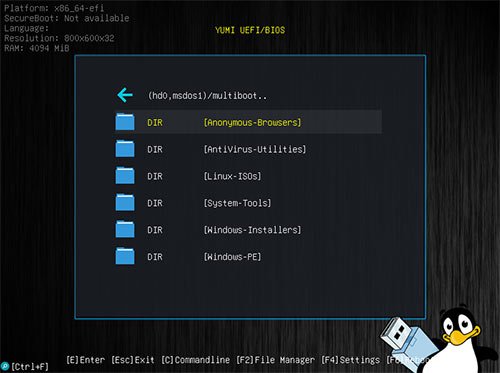
YUMI (Your Universal Multiboot Installer), is the successor to MultibootISOs. It can be used to create a Multiboot USB Flash Drive containing multiple operating systems, antivirus utilities, disc cloning, diagnostic tools, and more. Contrary to MultiBootISO's which used grub to boot ISO files directly from USB, YUMI uses syslinux to boot extracted distributions stored on the USB device, and reverts to using grub to Boot Multiple ISO files from USB, if necessary.
Read More
YUMI Py 1.0.3 | Size: 26.18 MB
Language: English
YUMI Py is a standalone Python build of YUMI that runs natively on both Windows and Linux from the same underlying codebase. It supports exFAT formatting, files larger than 4GB, multiboot menu generation, ISO/IMG/WIM/EFI/VHD(x) drag-and-drop support, and persistence for compatible Arch, Debian, Fedora, and Ubuntu based live systems - everything YUMI exFAT does, with one platform-specific exception: on Linux, YUMI Py can't run the guided Windows-On-VHD install (that needs diskpart/DISM, which are Windows-only tools). You can still drag and drop an existing VHD/VHDX file onto a Linux-prepared drive and boot it - you just can't build a brand new one from Linux. See the FAQ below for more detail.
Read More
YUMI Py 1.0.2 | Size: 26.14 MB
Language: English
YUMI Py is a standalone Python build of YUMI that runs natively on both Windows and Linux from the same underlying codebase. It supports exFAT formatting, files larger than 4GB, multiboot menu generation, ISO/IMG/WIM/EFI/VHD(x) drag-and-drop support, and persistence for compatible Arch, Debian, Fedora, and Ubuntu based live systems - everything YUMI exFAT does, with one platform-specific exception: on Linux, YUMI Py can't run the guided Windows-On-VHD install (that needs diskpart/DISM, which are Windows-only tools). You can still drag and drop an existing VHD/VHDX file onto a Linux-prepared drive and boot it - you just can't build a brand new one from Linux. See the FAQ below for more detail.
Read More
YUMI-exFAT 1.0.4.1 | Size: 19.3 MB
Language: English
YUMI (Your Universal Multiboot Installer), is the successor to MultibootISOs. It can be used to create a Multiboot USB Flash Drive containing multiple operating systems, antivirus utilities, disc cloning, diagnostic tools, and more. Contrary to MultiBootISO's which used grub to boot ISO files directly from USB, YUMI uses syslinux to boot extracted distributions stored on the USB device, and reverts to using grub to Boot Multiple ISO files from USB, if necessary.
Read More
YUMI-exFAT 1.0.4.0 | Size: 19.36 MB
Language: English
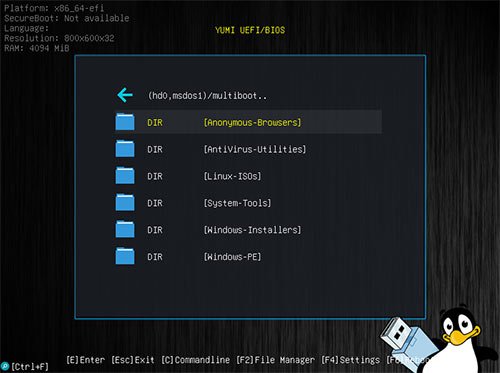
YUMI (Your Universal Multiboot Installer), is the successor to MultibootISOs. It can be used to create a Multiboot USB Flash Drive containing multiple operating systems, antivirus utilities, disc cloning, diagnostic tools, and more. Contrary to MultiBootISO's which used grub to boot ISO files directly from USB, YUMI uses syslinux to boot extracted distributions stored on the USB device, and reverts to using grub to Boot Multiple ISO files from USB, if necessary.
Aside from a few distributions, all files are stored within the Multiboot folder, making for a nicely organized Multiboot Drive that can still be used for other storage purposes.
Read More
YUMI-exFAT 1.0.3.9 | Size: 19.36 MB
Language: English
YUMI (Your Universal Multiboot Installer), is the successor to MultibootISOs. It can be used to create a Multiboot USB Flash Drive containing multiple operating systems, antivirus utilities, disc cloning, diagnostic tools, and more. Contrary to MultiBootISO's which used grub to boot ISO files directly from USB, YUMI uses syslinux to boot extracted distributions stored on the USB device, and reverts to using grub to Boot Multiple ISO files from USB, if necessary.
Aside from a few distributions, all files are stored within the Multiboot folder, making for a nicely organized Multiboot Drive that can still be used for other storage purposes.
Read More